What happened to Microsoft Whiteboard
Microsoft has ended Whiteboard for personal Microsoft accounts, and its standalone Windows, iPad and Android apps retire on 16 October 2026. Whiteboard continues only for work and school Microsoft 365 accounts, inside the web version and Teams.
Source: Microsoft Support.
What will feel familiar
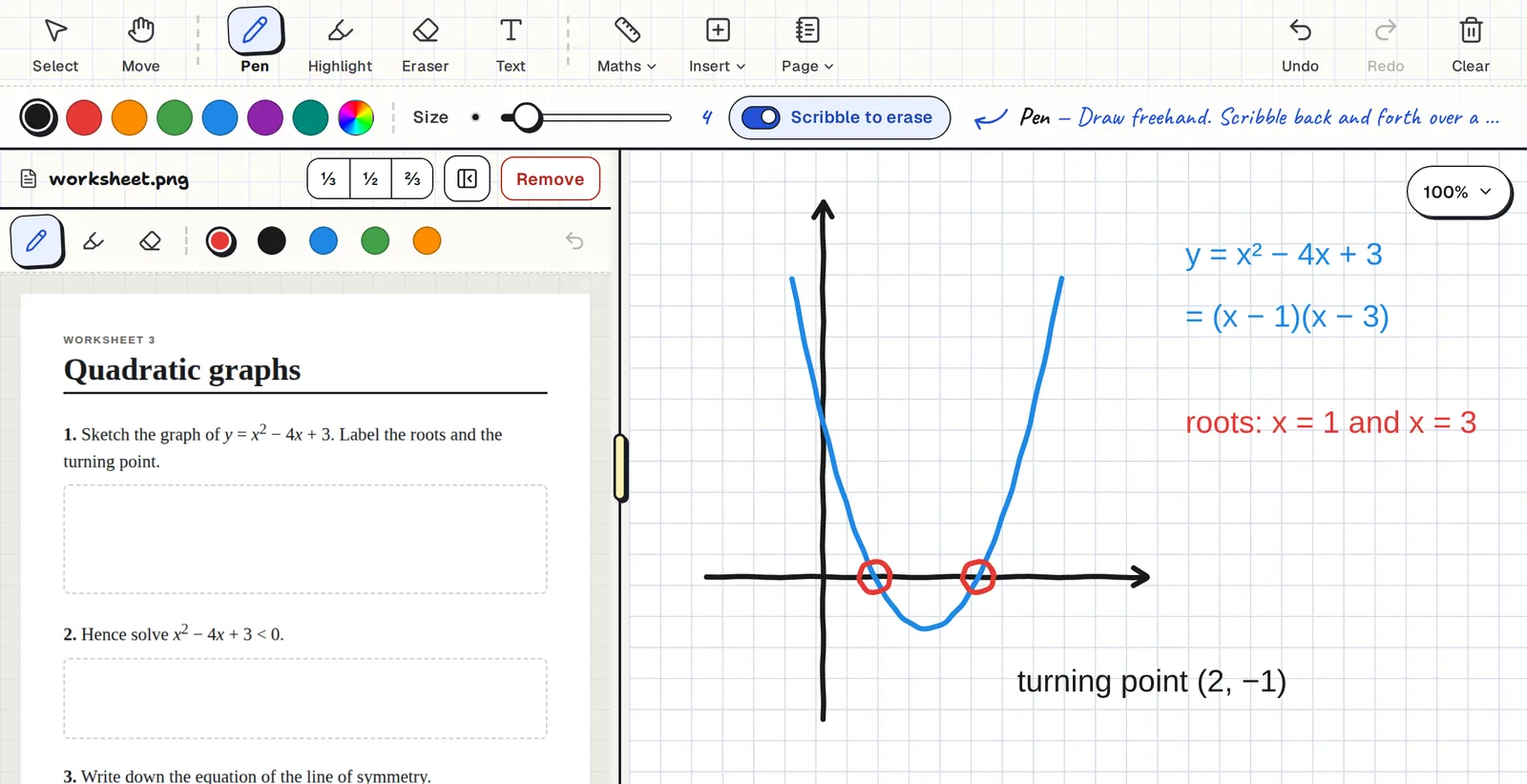
- A pen, a highlighter and an eraser, with colours and sizes.
- Text boxes and pictures you can move around.
- A ruler for straight lines.
- A board you can pan and zoom, with undo and redo.
- Sharing, so several people write on one board at once.
What's different
| Clean Slate | Microsoft Whiteboard | |
|---|---|---|
| Account | Any Google account. The demo needs none. | Work or school Microsoft 365 accounts only |
| Where it runs | Any browser: Windows, Mac, Linux, Chromebook, iPad, Android | Web and Teams. The standalone apps are being retired. |
| PDF beside the board | Yes, for everyone | Inserting documents needs a work or school account |
| A board for each student | Yes. Students join with a code and no account. | No |
| Price | Free | Included with Microsoft 365 for work or school |
Clean Slate also adds tools aimed at teaching: shapes drawn to the angles and lengths you set, a compass, Cartesian and polar graph paper, a scientific calculator, and lined, squared, dot grid or isometric paper.
Moving your boards across
- Sign in to Clean Slate with any Google account.
- Bring your old work across. If you exported boards from Microsoft Whiteboard as pictures, drop them onto a new board.
- Carry on. Draw over the picture, or start fresh beside it.
Clean Slate can't open Microsoft Whiteboard files directly.
Common questions
Is Clean Slate free?
Yes. There is no paid plan, no board limit and no ads.
Does it work on Mac, Android and Linux?
Yes. It runs in the browser, so it works on Mac, Windows, Linux, Chromebooks, iPads and Android tablets.
Can I import my Microsoft Whiteboard boards?
Not directly. Export them from Microsoft Whiteboard as pictures and drop the pictures onto a Clean Slate board.
Does it work offline?
No. Clean Slate needs an internet connection.
Is it open source?
No. It is free to use, but the code is not open source.
Do I need to sign up to try it?
No. The demo board opens with no sign-up.